MW4 Launch Errors and Server Fixes: What Actually Works?
Most MW4 launch errors are server load, not your setup. Here's how to tell whether the problem is Activision's or yours, an error-by-error fix table, and the PC and console checks to do before October 23.
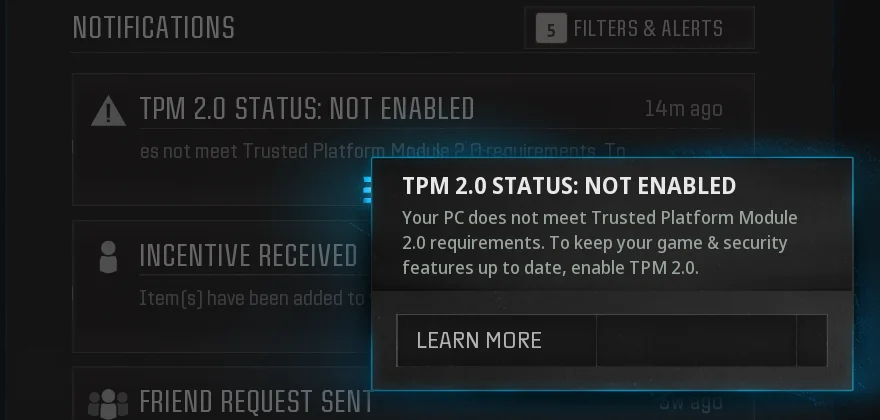
Check Activision's official server status page before you change any settings, because most MW4 launch errors come from server load and not from your setup. That's the main rule for MW4 launch errors and server fixes. During the beta, "Networking Failed to Start" (e.g. HUENEME – NEGEV) was almost always server load, not your hardware or account. If the status page is green, try these in order: power-cycle your router, switch to a public DNS, restart everything, then run a file scan and repair. On PC you also need TPM 2.0 and Secure Boot turned on.
MW4 isn't out yet. Activision's September 29 PC post confirms PC preload begins October 15 at 9 AM PT (Xbox on PC, Battle.net and Steam) and states the full game releases October 23 at midnight local time. Everything below comes from what went wrong in the Open Beta and what Activision has published for launch. None of it is live launch data yet. Once you get past the error screens, the camo and leveling grind starts. You can grind in public matches, in private matches, or with a service like our MW4 bot lobbiesfrom $4.99. That's one option among several.
MW4 launch errors and server fixes: is it the server or you?
Verdict: checking the status page takes 30 seconds and can save you 30 minutes of troubleshooting that won't help.
Official server status lives at support.activision.com/onlineservices (the "Call of Duty: Modern Warfare 4 Server Status" page). If your platform's indicator is not green, or there is an alert, the outage is on Activision's end and you wait it out. If status is green but you still can't connect, the issue is local: check your platform network (Xbox / PSN / Nintendo / Steam / Battle.net), then your own connection. For problems Activision has acknowledged, it pointed beta players to its live issues tracking on the official Modern Warfare 4 Trello board, and that's the likely place for launch tracking too.
Error-by-error: cause and first fix
| Error / symptom | Most likely cause | First fix | Whose problem |
|---|---|---|---|
| Networking Failed to Start (HUENEME – NEGEV) | Login servers at capacity | Wait, retry, then router + DNS | Usually Activision |
| Stuck on Checking for Updates / Online Services | Launcher can't reach update servers | Relaunch, flush DNS, check antivirus | Either |
| Kicked before the menu (attestation / BIOS message) | TPM 2.0 or Secure Boot off | Enable both in BIOS | Yours (PC) |
| Crash on launch | Corrupt files, old drivers, overlays | Scan and Repair, update GPU driver | Yours |
| Stutter with normal ping | Shader compile, VRAM pressure | Let Shader Preloading finish | Yours, not the server |
The random two-word code doesn't mean anything is wrong with you. It looks alarming, but it is not a hardware failure and not an account ban.
The fix order that clears most connection errors
Verdict: start with the free, fast fixes. Leave port forwarding for last.
- Check status first. If there's an alert, stop here and wait.
- Give it a few minutes. One third-party guide reports that most "Checking for Updates" loops during the MW4 beta weekend launches resolved within 15–30 minutes as Activision scaled capacity. Activision hasn't confirmed that number, so treat it as a rough guide.
- Router and DNS. The fastest home fixes are a 60-second router power-cycle, switching DNS to Cloudflare (1.1.1.1) or Google (8.8.8.8), and a full restart of the game and your console/PC.
- Repair the install. Use "Scan and Repair" in Battle.net or "Verify integrity of game files" on Steam.
- Check your antivirus. Windows Defender or third-party AV software (Bitdefender, Norton, Avast) can silently block the launcher's update-check request, producing an infinite spinner with no error message.
- NAT and ports, last. Turn on UPnP first. Some guides also list Call of Duty ports (UDP: 3074, 3478-3479, 27014-27030). That list comes from a third party, not from Activision's MW4 page.
If the status page shows an alert, changing DNS, reinstalling or tweaking your router won't fix it. Wait.
PC-only checks to sort out before October 23
Verdict: on PC, the security check is the only error you can completely prevent ahead of time. Do it this week.
- TPM 2.0 + Secure Boot. TPM 2.0 and Secure Boot are required to play Call of Duty: Modern Warfare 4 on PC. Activision's TPM page requires Windows 10 version 22H2 or later, or any version of Windows 11.
- CPU and GPU requirements. Only Intel/AMD processors (with AVX instruction set) are supported at this time. Intel ARC GPUs require Resizable Bar.
- Drivers. Activision's recommended versions are AMD: 26.7.1, NVIDIA: 616.56; ASD-compatible driver will be made available before MW4 launch, INTEL: 32.0.101.8974. One outlet says the new NVIDIA driver is due on October 21, before launch. Activision hasn't confirmed that date.
- Shaders. On Battle.net, preloading is active as soon as the beta is installed, while Steam players still need a one-time shader compile on first boot. That was beta behaviour, so expect something similar at launch.
- Storage. The game needs Windows 10 or 11 (64-bit), 115 GB of SSD storage, and both TPM 2.0 and Secure Boot. At least one site lists a smaller install size. Plan around the 115 GB figure.
Console notes
Verdict: consoles don't have a security check to set up, so launch-day trouble there is mostly server load.
- One guide notes that Secure Boot and TPM 2.0 are PC-only requirements. On Xbox Series X | S, PS5, and Switch 2 there's no equivalent setup step.
- On Xbox, Online Multiplayer still needs a Game Pass Essential subscription sold separately. If yours has lapsed, the error will look like a server problem.
- One of the PS5 beta fixes was to link your PS account to your CoD account. Check yours is linked now.
- Console preload windows remain unannounced as of October 2.
Related questions
Will MW4 have server errors on launch day? Probably in the first few hours, but Activision hasn't said anything about capacity. Third-party guides expect it because every major Call of Duty release floods the authentication servers at the moment millions of players hit Play simultaneously. That's a prediction based on past launches, not a confirmed fact.
Is stutter a server problem? No. Stutter and low FPS are not lag. If your ping is normal and only your frame-time is spiking, no amount of restarting the router will fix it.
Will my beta progress fix or affect anything? No. Your beta rank, weapon levels, and loadout unlocks reset at launch. Everyone starts from zero on October 23.
When exactly do servers open in my region? Our MW4 release time by region guide lists the unlock times. If your local time has passed and you still can't get in, go back to the status page.
Fixing errors on launch day should take minutes, but the camo and weapon grind that comes after takes dozens of hours. If you'd rather not spend all of them in public lobbies, our MW4 bot lobbiesfrom $4.99 are one way to get through that grind faster.
Related Call of Duty: Modern Warfare 4 services
Vetted boosters handle the grind covered in this guide, with live support and scheduled delivery.