MW4 Bot Lobbies PC vs Console: Which Platform Works Better?
MW4 bot lobbies work on both PC and console. The progress you farm is the same, but setup isn't: PC needs TPM 2.0 and Secure Boot before it can go online. Here's the platform-by-platform breakdown, plus the honest answer on safety.
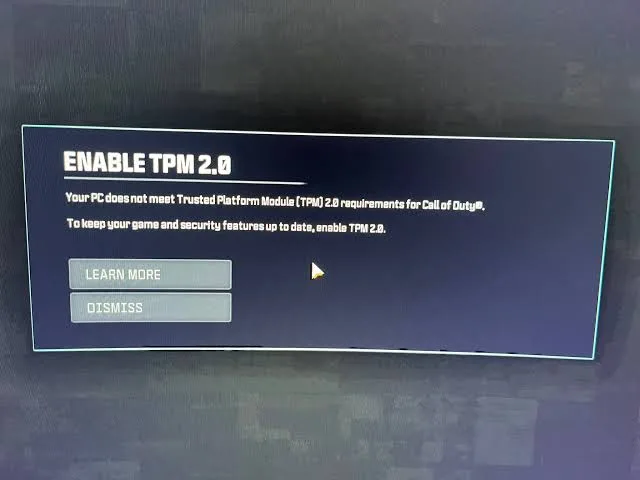
MW4 bot lobbies work on PC, PS5 and Xbox Series X|S, and the progress you farm is the same on all three. The one real difference is setup: PC players need TPM 2.0 and Secure Boot turned on, or Modern Warfare 4 won't let them into any online mode.
Choose the platform where you already play comfortably. Our MW4 Bot Lobbiesfrom $2.79 work through crossplay on PC, PS5 and Xbox. A single-lobby order gives you one complete match against five enemy bots.
MW4 bot lobbies PC vs console: the quick comparison
Verdict: same farm, different setup. Weapon XP, camo challenges and Soldier Rank all count the same way on every platform. What changes is the setup before your first match.
| PC (Battle.net / Steam / Xbox PC) | PS5 | Xbox Series X\ | S | |
|---|---|---|---|---|
| Joins our self-play lobbies | Yes | Yes | Yes | |
| TPM 2.0 + Secure Boot needed | Yes, for all online play | No | No | |
| Can disable crossplay | No (crossplay is always on) | Yes, in Account & Network | Yes, in-game plus a system-level setting | |
| Progress carries to other platforms | Yes, via your Call of Duty account | Yes | Yes | |
| Main setup risk | Failed secure attestation | Crossplay left off | Crossplay blocked in Xbox privacy settings |
MW4 released on October 23, 2026 for PS5, Xbox Series X|S, PC and Nintendo Switch 2. The PC version is available through Battle.net, Steam and the Xbox app.
PC: more setup, same rewards
Verdict: fine once your BIOS is sorted. It's a pain if it isn't.
On PC, MW4 requires TPM 2.0, UEFI boot mode and Secure Boot. Activision's RICOCHET Anti-Cheat checks for all three before it lets you matchmake. Some older Call of Duty games only locked Ranked Play behind Secure Boot. MW4 locks every online mode, and private sessions count. The beta enforced the same rule, which is why "secure attestation failed" was one of the most-searched errors back in August.
Run this checklist before you order:
- tpm.msc shows "The TPM is ready for use" with Specification Version 2.0
- msinfo32 shows BIOS Mode: UEFI and Secure Boot State: On
- Windows 10 22H2 (64-bit) or Windows 11
- No virtual machines. RICOCHET blocks virtualized environments.
If attestation keeps failing even with everything enabled, an outdated motherboard BIOS is usually the cause. Updating the firmware gives you a newer fTPM that passes the check.
Console: fewer steps, one setting to watch
Verdict: the lowest-friction way to use bot lobbies.
PS5 and Xbox skip the TPM and Secure Boot checks completely, because those are PC-only. The setting to watch on console is crossplay. Console players can turn it off under Settings → Account & Network, and Xbox has a second block under Privacy & Online settings → Communication & Multiplayer. If you've switched crossplay off to avoid PC players in public matches, expect to turn it back on for your session. Our team confirms the exact settings in your private order chat before you join.
Bot lobbies don't reward the platform with the best hardware. They reward the one you can join from without troubleshooting. On console, that's usually the case out of the box.
Is it safe? Will you get banned?
Here's the honest version. No service can promise you'll never be banned, and anyone who does is lying. What we can tell you is how our lobbies work:
- Self-play. You stay logged into your own account and earn every kill yourself.
- No password. We need your Activision ID, platform and region. We never need your login.
- No cheats, injectors or unlock tools. Nothing is installed on your PC or console.
Activision can penalize boosting for XP or unlocks, including when you play on your own account. See its enforcement policy.
For a look at the riskier alternatives people try, see our breakdown of how to get bot lobbies in MW4 and which method actually works.
Pros and cons of self-play bot lobbies
Pros
- Works on PC, PS5 and Xbox with one Activision ID
- Hourly access starts when you first join. You can rejoin during the time you purchased.
- No account sharing and no third-party software
- From $3.99, the cheapest way to clear a big challenge list
Cons
- You still have to put in the playtime yourself
- PC players must pass secure attestation first, and no service can fix your BIOS for you
- No service can guarantee zero ban risk, and we don't pretend to
Related questions
Do I need to play on the same platform as the lobby host? No. MW4 has crossplay across PS5, Xbox Series X|S, PC and Switch 2, so a session can mix platforms. On console, crossplay needs to be enabled for that to work.
Does progress from a PC session show up on my PS5? Yes. Progress is tied to your Call of Duty account, not your hardware, so camos and levels you earn on PC show up on console too.
Do MW4 bot lobbies work on Switch 2? It's the newest platform, so it has its own caveats. We cover them in Do MW4 Bot Lobbies Work on Switch 2?
Is PC faster for farming because of higher FPS? Not in any way that matters much. The bots are the bottleneck, not your monitor. Use whichever controller or keyboard setup you aim best with.
Before you book MW4 Bot Lobbiesfrom $2.79, sign in to the Activision account you intend to use, check crossplay and choose a match bundle or hourly access on the order panel.
Related Call of Duty: Modern Warfare 4 services
Vetted boosters handle the grind covered in this guide, with live support and scheduled delivery.
MW4 Bot Lobbies
MW4 Bot Lobbies are Modern Warfare 4 matches with 5 bots on the enemy team, so you farm weapon levels, camo challenges and player XP instead of grinding public matches. It's self-play on your own account — no password, just your Activision ID — with cross-play on PS5, Xbox, PC and Switch 2.
MW4 Camo Boost – Gold, Platinum & Harmonic Break on Up to 15 Weapons
Gold, Platinum or Harmonic Break on the Modern Warfare 4 weapons you actually use — one to fifteen of them — done in real matches by a verified booster. Gold is $6.99 on a weapon that is already at max level, or $16.98 from scratch (max level $9.99 + Gold $6.99); Platinum or Harmonic Break $4.99. Doing all 33? Our Divergence page sells the whole arsenal for less.