BO7 Failed Attestation Status Error: 6 Fixes That Work (2026)
Failed Attestation Status in Black Ops 7 means RICOCHET couldn't verify your PC's TPM 2.0 and Secure Boot, so you're locked out of Ranked and most playlists. Here's how to fix it fast.
What "Failed Attestation Status" actually means
Failed Attestation Status in Black Ops 7 means RICOCHET Anti-Cheat couldn't confirm your PC meets Call of Duty's security requirements — usually TPM 2.0, Secure Boot, or an out-of-date BIOS — so it dumps you into a restricted matchmaking pool.
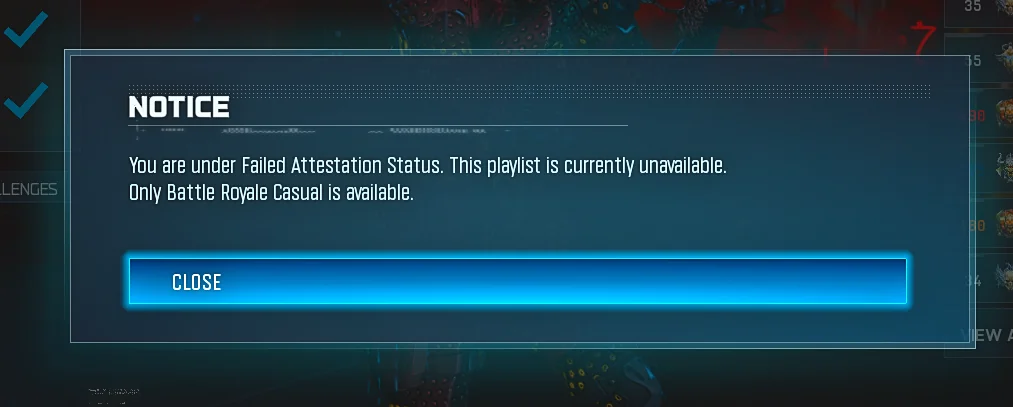
Here's the verdict up top: it's not a ban. "Failed Attestation Status" is a security check, not a punishment. Your account is fine — you're just placed in a restricted matchmaking pool (Nuketown 24/7 in Black Ops 7, Battle Royale Casual in Warzone) until your PC passes the TPM 2.0 / Secure Boot attestation.
The reason you're seeing it now: TPM 2.0 and Secure Boot have been required since Season 05 (August 2025), but Season 4 (live June 4, 2026) tightened enforcement so non-compliant systems are actively shunted into a restricted matchmaking pool instead of just warned. If you were fine last month and got hit after the Season 4 patch, that's why.
Activision doesn't sugarcoat the restriction. Players who do not complete attestation will be limited to Nuketown 24/7 in Call of Duty: Black Ops 7 and Battle Royale Casual in Call of Duty: Warzone. No Ranked, no camo grind on real modes, no XP where it counts.
Quick-fix checklist (most likely fix first)
Verdict: 90% of cases are a BIOS/firmware problem, not a missing toggle. Run this order.
- Run the official Secure Attestation Wizard — it tells you exactly which check fails.
- Enable TPM 2.0 in BIOS.
- Enable Secure Boot (needs UEFI mode + GPT disk).
- Update your BIOS/firmware — the real fix for most AMD boards.
- Clear TPM, re-enable Secure Boot, rerun the Wizard.
- Full restart (not sleep) and relaunch — status can lag a reboot.
Before you touch BIOS: worry about BitLocker. Flashing BIOS, toggling Secure Boot or clearing the TPM can trigger BitLocker recovery on the next boot. Save your recovery key first via your Microsoft account → Devices → See details.
Fix 1 — Run the Secure Attestation Wizard (do this first)
Don't guess which setting is broken — let Activision's own tool tell you.
The Secure Attestation Wizard scans the BIOS information on your PC to determine if it meets the security requirements to play. If security requirements are met, you will be able to play. If it detects your system is not compliant, you'll get a notification and instructions for next steps.
The wizard is packaged in a .zip file. Once downloaded, extract it, then double-click CODSecureAttestationWizard.exe and follow the steps to accept the Terms and run the scan. If it comes back compliant but the game still blocks you, restart the PC fully (not sleep) and relaunch — the in-game status can lag a reboot.
Fix 2 — Enable TPM 2.0
No TPM 2.0, no full playlists. It's mandatory for BO7 on PC now.
Check it fast: press Windows Key + R, type tpm.msc and press Enter. If it says "The TPM is ready for use", you're good. If it says "Compatible TPM cannot be found", TPM might be disabled in the BIOS. Reboot into BIOS and turn it on (it's often labelled fTPM on AMD or PTT on Intel).
Fix 3 — Enable Secure Boot (UEFI + GPT)
Secure Boot only works in UEFI mode with a GPT system disk — Legacy mode fails the check even if the toggle is on.
In BIOS: go to Security > Secure Boot Configuration. Ensure Secure Boot = Enabled and Legacy Support = Disabled. If available, select Restore Factory Keys, then save and exit. Secure Boot must use factory keys for attestation to pass.
Double-check your boot mode: press Windows + R, type msinfo32, press Enter, and check BIOS Mode. It must say UEFI (not Legacy). If it says Legacy, secure attestation will fail even if Secure Boot is on.
Fix 4 — Update your BIOS/firmware (the one that actually fixes it)
If TPM 2.0 and Secure Boot are already ON and you still fail, it's your TPM firmware version — flash a newer BIOS.
This is the fix nobody wants to hear but it's the correct one. On the vast majority of "I have everything on and it still fails" reports, the fix is a firmware update that bumps your fTPM version — not flipping another switch.
The AMD rule is specific. If your Manufacturer Version is AMD 3..0. (where * is any number), your motherboard requires a firmware update. Contact your motherboard manufacturer's customer support to find out if a firmware update is available. In practice that means if your fTPM Manufacturer Version reads 3.x.0.x (e.g. 3.92.0.5), you must flash a newer BIOS so the version becomes 3.x.5.x or higher (e.g. 3.92.5.5). Open tpm.msc to read your version, then update the fTPM firmware via the latest BIOS, Clear TPM and re-enable Secure Boot, and rerun the Wizard.
Intel isn't fully off the hook either. If your Manufacturer Version is INTC 302.12.. or INTC 303.12.., your motherboard may require a firmware update.
Fix 5 — Keep Windows current
A stale Windows build is a sneaky cause of attestation failures.
Keep Windows current. A stale Windows build is a common cause of the "TCG Event Log Failed" result. Install pending updates, reboot, and rerun the Wizard before you assume your hardware is the problem.
Fix 6 — Don't try to cheese it with a VPN
Spoofing your way around attestation is a worse idea in Season 4 than ever.
RICOCHET now checks your system state through Microsoft, not just your own PC. RICOCHET uses Remote Attestation to verify PC security settings directly with Microsoft. Some games rely on local checks on the player's PC, but those can be manipulated to falsely report everything is "all clear" — Remote Attestation validates through trusted Microsoft servers instead, making it much harder for tampered systems to appear legitimate. Avoid VPN/spoof "easy lobby" tricks in Season 4. With Remote Attestation reading your system state through Microsoft, manipulating matchmaking with sketchy tools is riskier than ever.
If nothing works
Some rigs simply can't pass, and that's the honest answer. Cheap X99/server boards (Machinist, Huananzhi) and most cloud PCs/VMs can fail this check permanently. Budget X99 boards and server/workstation platforms frequently have incomplete SMBIOS tables or firmware that never gets updated, so attestation rejects them even with TPM and Secure Boot correctly enabled.
If your firmware is current, the version is right, TPM is cleared, and it still fails: a clean Windows 11 reinstall has resolved it for players whose system files were corrupted (often after a hardware swap). Make a bootable Windows 11 USB with the official Media Creation Tool, back up your files, and do a clean install with Secure Boot and TPM enabled in BIOS first. Treat this as the final option.
Still stuck? Check Activision's Known Issues page and open a support case there. And to be clear on the difference between this and a real punishment — if you're ever unsure whether a restriction is attestation or something else, our breakdown of whether you can get banned in BO7 is worth a read.
While you're locked to Nuketown 24/7, your Ranked climb, camo challenges and weapon XP all sit frozen — and a multi-day BIOS-and-firmware fix can quietly eat a chunk of the season. Once you're compliant again and want to claw that lost time back, our BO7 weapon leveling servicefrom $29.99 rebuilds your guns to Prestige Master through 100% manual gameplay while you keep control of your account. It won't fix your BIOS — but it'll erase the grind the downtime cost you.
Related Call of Duty: BO7 services
Vetted boosters handle the grind covered in this guide, with live support and scheduled delivery.
BO7 Account Leveling & Prestige Boost
Military rank 1–55, any Prestige 1–10, and Prestige Master up to level 1000 — set your current and target progress and the price updates live. Piloted on your account.
COD BO7 Bot Lobbies
Private bot lobbies for camo challenges, weapon leveling, account XP, and calling card progress. No account password is required — you stay in full control of your own account. After checkout, our team will guide you through Discord or live chat and help complete your order safely and smoothly.